Factories > Infrastructure
Deployment patterns for Warp Factories
# Deployment patterns for Warp Factories Choose an execution model for your factory based on where its code must run and who operates the compute. Warp-hosted execution is the default. Managed self-hosting keeps checkout and command execution in your network while Warp coordinates the work.  ## Choose an execution model | If your factory needs to... | Choose | | --- | --- | | Run public repositories and services without operating workers | [Warp-hosted execution](#warp-hosted-execution) | | Reach private repositories or services behind your network boundary | [Managed self-hosting](#managed-self-hosting) | | Run standalone agents from CI or developer infrastructure, without a factory | [Unmanaged execution](/platform/unmanaged-execution/) | Both factory options use the same [factory definition](/factories/factory-as-code/), [runners](/factories/runners/), and [factory dashboard](/factories/factory-dashboard/). The execution host changes the location of checkout, command execution, and the sandbox filesystem. ## Warp-hosted execution Use this when your factory can reach its repositories and services over the public internet. The Automation Platform runs the work on Warp-managed infrastructure while your factory definition selects the agents, runner, workspace, and credentials.  See the [cloud agent run lifecycle](/platform/architecture/#cloud-agent-run-lifecycle) reference for a description of each component in the architecture. ### What it looks like * **Work intake**: Factory automations, configured integrations, Factory MCP, or factory endpoints * **Execution**: Automation Platform-hosted environments (Docker-based) * **Visibility**: Factory dashboard, session sharing, and APIs ### Why teams choose it * You want the simplest path to reproducible, scalable cloud execution. * You want to run many tasks in parallel without building your own sandboxing and scaling layer. * You want a consistent "production" setup with standardized environments and centralized configuration. ### Send work to a factory * [Factory automations](/factories/automations/) route integration events, schedules, and webhooks to agents in the factory. * [Factory integrations](/factories/connect-your-factory/) let teammates send work from Slack, Linear, Jira, GitHub, and GitLab. * [Factory endpoints](/factories/factory-api/) let your service find a factory and dispatch work by UID. * [Factory MCP](/factories/factory-mcp/) lets a coding agent hand work to a factory. For standalone cloud-agent triggers, see [cloud agents](/platform/). ## Managed self-hosting Use this when a factory must run checkout and execution on your infrastructure while the Automation Platform coordinates the work and records its results. Repositories are cloned and stored only on your infrastructure. Orchestration metadata and session transcripts route through Warp's backend; cloud conversations require Warp to store conversation data according to Warp's retention terms. LLM inference requests and responses route through Warp to contracted model providers under [ZDR](/enterprise/security-and-compliance/security-overview/#zero-data-retention-zdr), except for provider-specific models that are not covered by ZDR and follow the provider's retention requirements. Think of managed self-hosting as **customer-hosted execution with Warp-hosted orchestration**, not as a fully offline agent stack. Code repositories, build artifacts, runtime secrets, and execution workspaces stay on your infrastructure. Code context can still appear in session transcripts and LLM prompts as the agent works. :::note **Enterprise feature**: Self-hosted execution is available exclusively to teams on an Enterprise plan. ::: Self-hosting has two architectures that differ on **who orchestrates agent runs** (both keep code and execution on your infrastructure): * **[Managed](/factories/self-hosting/#managed-architecture)** — The Automation Platform orchestrates. You run the `oz-agent-worker` daemon; the Automation Platform routes runs to it from Slack, Linear, schedules, the API, or `oz agent run-cloud`. Tasks execute in Docker containers, Kubernetes Jobs, or directly on the host. * **[Unmanaged](/platform/unmanaged-execution/)** — You orchestrate. Invoke `oz agent run` directly from your CI, Kubernetes, or dev environment for standalone-agent work. To route factory work to a worker instead, use the managed architecture above. Why teams choose self-hosted execution: * Code and execution must stay within your network boundary for compliance or security requirements. * Agents need to access services behind a VPN or self-hosted SCMs like GitLab or Bitbucket. Warp-hosted agents can also access GitLab and Bitbucket over the public internet — see the [GitLab](/platform/integrations/gitlab/) and [Bitbucket](/platform/integrations/bitbucket/) setup guides. * Your environments (multi-service stacks, heavy resource requirements) don't fit in a single Docker container. For factory worker setup and a quickstart, start with [Managed self-hosting](/factories/self-hosting/). For security and network boundaries that apply to both managed and unmanaged execution, see [Execution security](/platform/execution-security/). ## Related pages * [Infrastructure and security](/factories/infrastructure-and-security/) - Choose execution, inference, storage, and credential boundaries for a factory. * [Warp-hosted execution](/factories/warp-hosting/) - Review hosted execution capacity, networking, and supported environments. * [Managed self-hosting](/factories/self-hosting/) - Install and operate a factory worker on your infrastructure. * [Unmanaged execution](/platform/unmanaged-execution/) - Run standalone agents outside a factory.Tell me about this feature: https://docs.warp.dev/factories/deployment-patterns/Choose Warp-hosted or managed self-hosted execution for Warp Factories based on your network, compliance, and operational requirements.
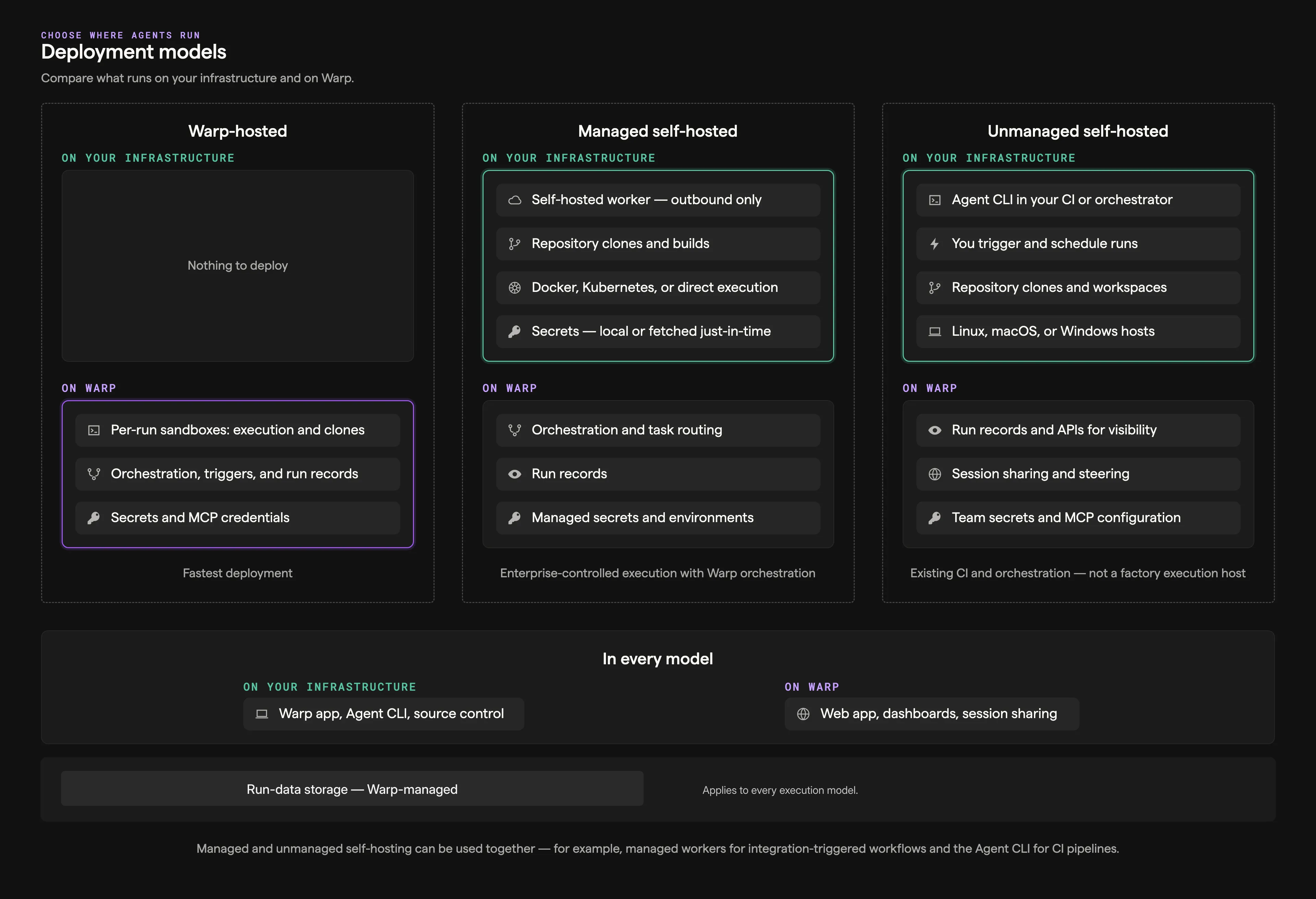
Choose an execution model for your factory based on where its code must run and who operates the compute. Warp-hosted execution is the default. Managed self-hosting keeps checkout and command execution in your network while Warp coordinates the work.
Choose an execution model
Section titled “Choose an execution model”| If your factory needs to… | Choose |
|---|---|
| Run public repositories and services without operating workers | Warp-hosted execution |
| Reach private repositories or services behind your network boundary | Managed self-hosting |
| Run standalone agents from CI or developer infrastructure, without a factory | Unmanaged execution |
Both factory options use the same factory definition, runners, and factory dashboard. The execution host changes the location of checkout, command execution, and the sandbox filesystem.
Warp-hosted execution
Section titled “Warp-hosted execution”Use this when your factory can reach its repositories and services over the public internet. The Automation Platform runs the work on Warp-managed infrastructure while your factory definition selects the agents, runner, workspace, and credentials.
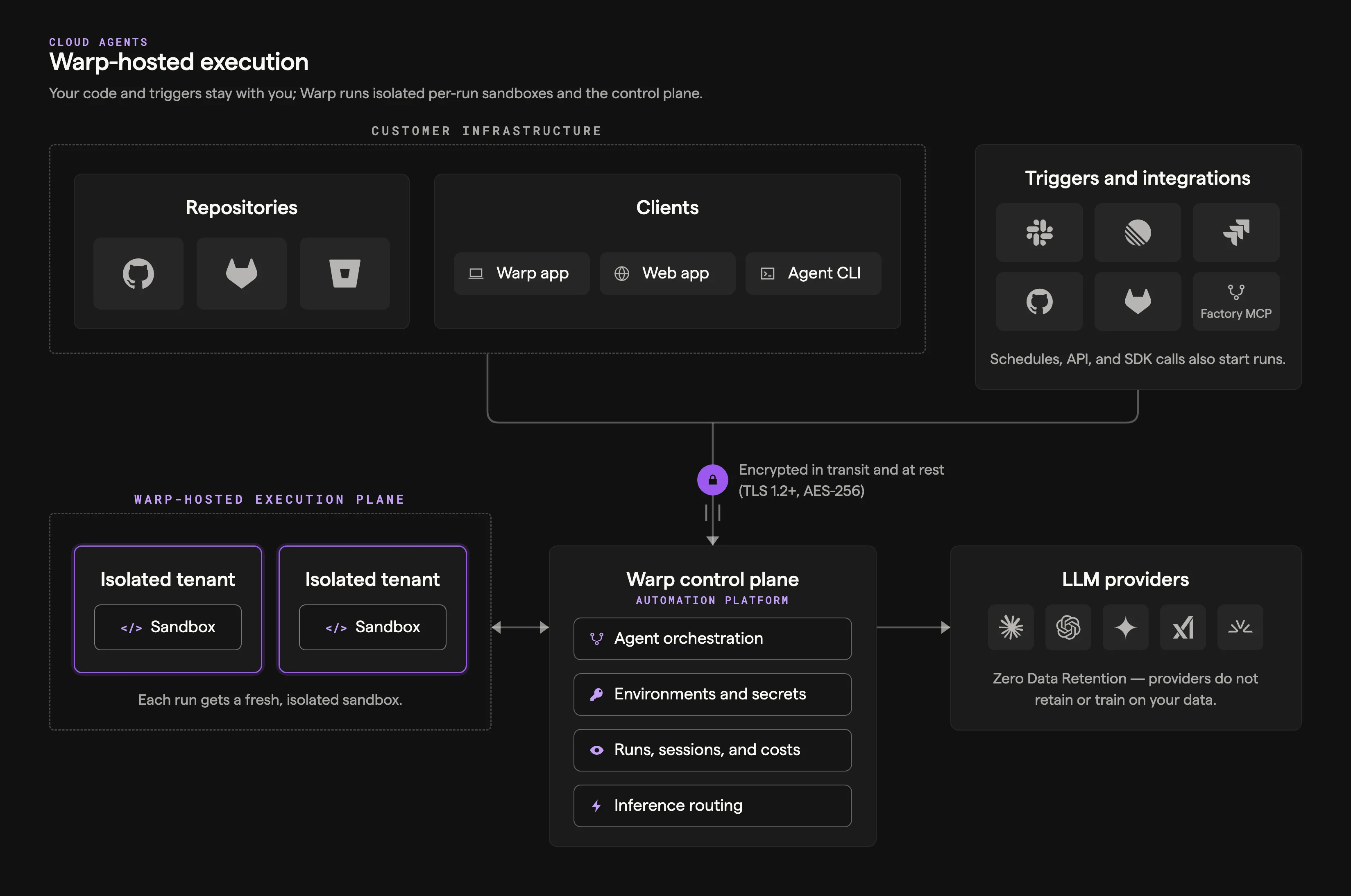
See the cloud agent run lifecycle reference for a description of each component in the architecture.
What it looks like
Section titled “What it looks like”- Work intake: Factory automations, configured integrations, Factory MCP, or factory endpoints
- Execution: Automation Platform-hosted environments (Docker-based)
- Visibility: Factory dashboard, session sharing, and APIs
Why teams choose it
Section titled “Why teams choose it”- You want the simplest path to reproducible, scalable cloud execution.
- You want to run many tasks in parallel without building your own sandboxing and scaling layer.
- You want a consistent “production” setup with standardized environments and centralized configuration.
Send work to a factory
Section titled “Send work to a factory”- Factory automations route integration events, schedules, and webhooks to agents in the factory.
- Factory integrations let teammates send work from Slack, Linear, Jira, GitHub, and GitLab.
- Factory endpoints let your service find a factory and dispatch work by UID.
- Factory MCP lets a coding agent hand work to a factory.
For standalone cloud-agent triggers, see cloud agents.
Managed self-hosting
Section titled “Managed self-hosting”Use this when a factory must run checkout and execution on your infrastructure while the Automation Platform coordinates the work and records its results. Repositories are cloned and stored only on your infrastructure. Orchestration metadata and session transcripts route through Warp’s backend; cloud conversations require Warp to store conversation data according to Warp’s retention terms. LLM inference requests and responses route through Warp to contracted model providers under ZDR, except for provider-specific models that are not covered by ZDR and follow the provider’s retention requirements.
Think of managed self-hosting as customer-hosted execution with Warp-hosted orchestration, not as a fully offline agent stack. Code repositories, build artifacts, runtime secrets, and execution workspaces stay on your infrastructure. Code context can still appear in session transcripts and LLM prompts as the agent works.
Self-hosting has two architectures that differ on who orchestrates agent runs (both keep code and execution on your infrastructure):
- Managed — The Automation Platform orchestrates. You run the
oz-agent-workerdaemon; the Automation Platform routes runs to it from Slack, Linear, schedules, the API, oroz agent run-cloud. Tasks execute in Docker containers, Kubernetes Jobs, or directly on the host. - Unmanaged — You orchestrate. Invoke
oz agent rundirectly from your CI, Kubernetes, or dev environment for standalone-agent work. To route factory work to a worker instead, use the managed architecture above.
Why teams choose self-hosted execution:
- Code and execution must stay within your network boundary for compliance or security requirements.
- Agents need to access services behind a VPN or self-hosted SCMs like GitLab or Bitbucket. Warp-hosted agents can also access GitLab and Bitbucket over the public internet — see the GitLab and Bitbucket setup guides.
- Your environments (multi-service stacks, heavy resource requirements) don’t fit in a single Docker container.
For factory worker setup and a quickstart, start with Managed self-hosting. For security and network boundaries that apply to both managed and unmanaged execution, see Execution security.
Related pages
Section titled “Related pages”- Infrastructure and security - Choose execution, inference, storage, and credential boundaries for a factory.
- Warp-hosted execution - Review hosted execution capacity, networking, and supported environments.
- Managed self-hosting - Install and operate a factory worker on your infrastructure.
- Unmanaged execution - Run standalone agents outside a factory.